 Posted by
 videobyte dvd creator5.2.36 new updates

VideoByte DVD Creator is a versatile and user-friendly tool designed to help you easily burn videos, photos, and digital media files onto DVDs, Blu-ray discs, or ISO files. Whether you want to preserve your memories, create professional video discs, or produce high-quality home movies, this software offers an intuitive interface and powerful features to make the process smooth for beginners and advanced users alike. With customizable menus, multiple video editing options, and support for a wide range of formats, VideoByte DVD Creator ensures that your final disc looks polished and plays seamlessly on any standard DVD or Blu-ray player.
Home-made movies or videos downloaded from online platforms can be easily burned onto DVD or Blu-ray using VideoByte DVD Creator. It supports content from popular websites like YouTube, Vimeo, Facebook, Dailymotion, Vevo, and many others. The software allows you to import 3D videos as well as high-definition formats including 720p, 1080p, and even 4K. It is compatible with a wide range of video file types such as AVI, MPEG, 3GP, MP4, VOB, FLV, M2TS, MTS, TS, SWF, MKV, MPG, MPA, DAT, DV, NSV, MOV, QT, RMVB, DivX, and more. This ensures that almost any video you have can be transformed into a high-quality DVD or Blu-ray disc effortlessly.
Key Features:
- Burn Videos to DVD/Blu-ray Easily: Create DVD or Blu-ray discs from home-made videos or downloaded clips from platforms like YouTube, Facebook, Vimeo, Dailymotion, and more.
- Wide Format Support: Supports a vast range of video formats, including AVI, MP4, MKV, FLV, MOV, MTS, M2TS, RMVB, MPEG, VOB, 3GP, and even 3D and 4K video files.
- High-Quality Output: Ensures smooth and high-quality playback on any standard DVD or Blu-ray player with professional-grade encoding technology.
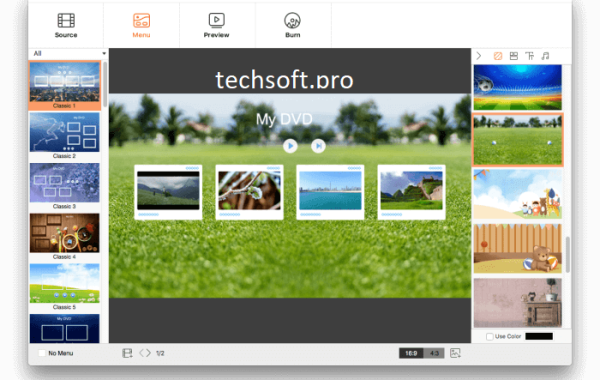
- Customizable DVD/Blu-ray Menus: Choose from various menu templates or create your own to give your disc a personalized and professional look.
- Built-in Video Editor: Edit videos before burning with features such as trimming, cropping, rotating, adjusting brightness/contrast, adding subtitles, watermarks, and more.
- Create Photo Slideshows: Turn your photos into beautiful slideshows with background music and customizable effects.
- Fast Burning Speed: Optimized for quick conversion and disc burning without sacrificing video quality.
- Supports ISO Files and DVD Folder: Burn videos to ISO image files or DVD folders for backup or later disc creation.
- Add Subtitles and Audio Tracks: Insert external audio tracks and subtitles in popular formats like SRT, ASS, and SSA.
- Real-Time Preview: Preview your project before burning to ensure everything looks perfect.
System Requirements:
- Operating System: Windows 11, 10, 8, 7 (32-bit or 64-bit)
- Processor: 1GHz Intel/AMD CPU or above
- RAM: At least 1GB (2GB or more recommended)
- Hard Disk Space: Minimum 200MB free space for installation
- Graphics: DirectX 9.0 or later
- DVD/Blu-ray Drive: Required for burning discs
- Other Requirements: Stable internet connection for software activation (optional)
How to Install:
- Download the DMG File: Go to the official VideoByte website and download the macOS version of the software.
- Open the DMG File: Find the downloaded file and double-click to open it.
- Drag to Applications: Drag the VideoByte DVD Creator icon into your Applications folder.
- Open the Application: Go to Applications and double-click the app to launch it.
- Allow Permissions (If Required): If macOS displays a security warning, go to System Preferences > Security & Privacy, then click “Open Anyway”.
Click Here To Download Link